Softwarespezifikationen
伊格斯®智能塑料
软件和代码规范 i.Cee²
软件信息
| 节点红 | 格拉法纳 | influxDB | |
|---|---|---|---|
| 版本 | 4.1.4 | 12.3.1 | 2.8.0 |
| 港口 | 1880年 | 3000 | 8086 |
| 状况 | 干净 | 干净 | 干净 |
| 认证 | 没有 | 用户/通行证(管理员/管理员) | 未定义,首次登录接口时配置。 |
| GUI on | http:// |
http:// |
http:// |
MQTT 经纪人
港口:1883年
地址:AP-> 192.168.30.1
Eth1: 93.48.86.253
用户:<没必要>
登录 <无需>
继电器输出演员
应用界面
MQTT代理开放部分可用的用户应用界面和功能。简化的界面用于配置和接收外围数据。该区域与经纪人的连接不需要任何访问数据。
设置/重置数字输出引脚/引脚状态
两个中继的默认状态都是开启。
问题主题:relayOutputs/config/in
{
  "id": "<TIMESTAMP>",
  "origin": "APP",
  "task": {
    "taskParams": {
      "D01": {
        "state": "open"
      },
      "D02": {
        "state": "open"
      }
    }
  }
}
{
  "id": "<TIMESTAMP>",
  "origin": "APP",
  "task": {
    "taskResult": {
      "D01": {
        "success": true,
        "state": "open"
      },
      "D02": {
        "success": true,
        "state": "open"
      }
    }
  }
}
激活所有中继器
请求主题:relayOutputs/runtime/in
{
  "id": "<TIMESTAMP>",
  "origin": "APP",
  "task": {
    "action": "READ"
  }
}

Reply-Topic: relayOutputs/runtime/out

{
  "id": "<TIMESTAMP>",
  "origin": "APP",
  "task": {
    "taskResult": {
      "D01": {
        "success": true,
        "state": "open"
      },
      "D02": {
        "success": true,
        "state": "close"
      }
    }
  }
}
设置所有中继的状态
请求主题:relayOutputs/runtime/in
{
  "id": "<TIMESTAMP>",
  "origin": "APP",
  "task": {
    "action": "SET",
    "taskParams": {
      "D01": {
        "state": "open"
      },
      "D02": {
        "state": "close"
      }
    }
  }
}
{
  "id": "<TIMESTAMP>",
  "origin": "APP",
  "task": {
    "taskResult": {
      "D01": {
        "success": true,
        "state": "open"
      },
      "D02": {
        "success": true,
        "state": "close"
      }
    }
  }
}
RTC演员
应用界面
MQTT代理开放部分可用的用户应用界面和功能。简化的界面用于配置和接收外围数据。与该领域的经纪人建立联系无需信任投票。
设定定时器/闹钟中断
模式: 计时器,不管有没有闹钟。
alarmSet: 报警中断的日期和时间(无论模式是否定时器,均无影响)。
timerSetSeconds: 计时器中断的秒数(无论模式是否闹钟都无影响)。
期望主题:时钟/配置/设置
{
  "id": "<TIMESTAMP>",
  "origin": "APP",
  "task": {
    "taskParams": {
      "CLOCK\_SET\_MODE": {
        "mode": "timer",
        "alarmSet": "\[timestamp epoch ms\]",
        "timerSetSeconds": "<INT>"
      }
    }
  }
}
{
  "id": "<TIMESTAMP>",
  "origin": "APP",
  "task": {
    "taskResult": {
      "success": true,
      "CLOCK\_SET\_MODE": {
        "mode": "timer",
        "alarmSet": "\[timestamp epoch ms\]",
        "timerSetSeconds": "<INT>"
      }
    }
  }
}
切换RTC同步逻辑(如下所述)
tcState: RTC同步逻辑的状态,该值为非持久性,因此每次重启时该值都会恢复为默认值(默认值为ON)
期望主题:时钟/配置/设置
{
  "id": "<TIMESTAMP>",
  "origin": "APP",
  "task": {
    "action": "TOGGLE"
  }
}

Req-Topic: clock/config/out

{
  "id": "<TIMESTAMP>",
  "origin": "APP",
  "task": {
    "taskResult": {
      "success": true,
      "rtcState": "OFF"
    }
  }
}
读时钟配置
模式: 计时器,不管有没有闹钟。
alarmSet: 报警中断的日期和时间(无论模式是否定时器,均无影响)。
timerSetSeconds: 计时器中断的秒数(无论模式是否闹钟都无影响)。
rtcState: RTC同步逻辑的当前状态。
期望主题:时钟/配置/设置
答案主题:时钟/配置/关闭{
"id": "<TIMESTAMP>",
"origin": "APP",
"task": {
"taskResult": {
"success": true,
"CLOCK\_CONFIGS": {
"mode": "timer",
"alarmSet": "\[timestamp epoch ms\]",
"timerSetSeconds": "<INT>",
"rtcState": "ON"
}
}
}
}
阅读钟
需求主题:时钟/运行时间/同相
{
"id": "<TIMESTAMP>",
"origin": "APP",
"task": {
"taskResult": {
"success": true,
"timestamp": "\[timestamp epoch ms\]"
}
}
}
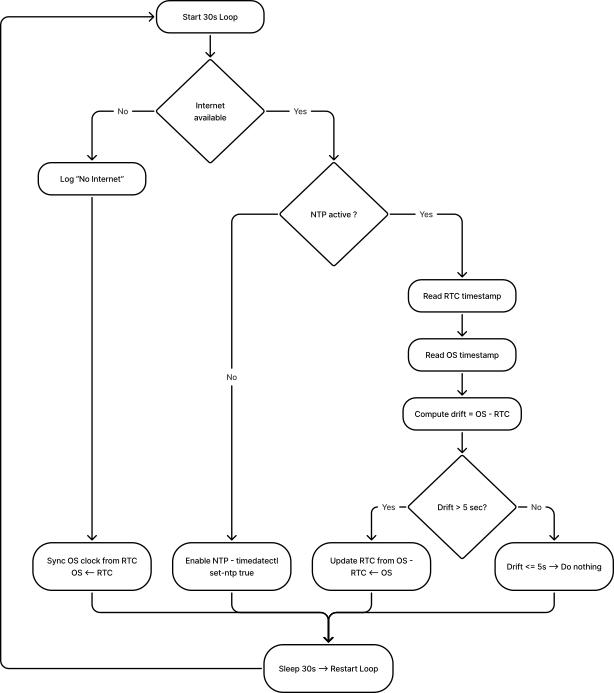
同步环流程图(每30秒)
RTC 演员 – 概述
核心系统健康演员
应用界面
MQTT代理开放部分可用的用户应用界面和功能。
该接口允许任何外部应用接收系统指标,如 CPU 负载、内存使用率、磁盘使用率、温度、核心频率、系统限速状态和可用性。订阅本主题无需任何资格要求。系统健康演员不会接收任何命令。它完全自主,每1秒发布一次指标。
运行时数据
主题:SystemHea l th/runtime/ off
释放率:1 Hz(每秒一条消息,肯定时钟跳跃)
指标
| 钥匙 | 描述 | 单位 |
|---|---|---|
| CPU_percent | 当前CPU负载 | % |
| CPU_tempC | CPU温度从Linux的热区读取 | ºC |
| CPU0_freq | CPU 核心 O 电流频率 | Hz |
| cpul_freq | CPU核心1电源频率 | Hz |
| CPU2_freq | CPU Core 2 电源频率 | Hz |
| CPU3_freq | CPU 核心 3 电源频率 | Hz |
| CPU0_throttle | 系统节流状态注册表 | 六边形 |
| 拉姆_percent | 内存使用情况 | % |
| 磁盘_percent | 文件系统根目录的磁盘使用情况 / | % |
| Uptime_sec\ | 自上次重启以来的时间 | 秒 |
示例有效载荷(systemHealth/运行时/输出)
{ “id”:1736022028123, “起源”:“系统健康”, “任务”:{ “taskResult”: { “CPU_percent”:7.1, “CPU_tempC”: 47.3, “CPU0_freq”: 15000000000, “CPU1_freq”: 15000000000, “CPU2_freq”: 15000000000, “CPU3_freq”: 1500000000, “cpu0_throttle”:“0x0”, “拉姆/_percent”:32.9, “disk_percent\”: 41.2, “上_sec”:5321 } } }
外围设备健康
为了维护外设的健康,我们必须在每个总线管理器中实现一个SystemHealth角色(busi2cO、busi2c-1等)。
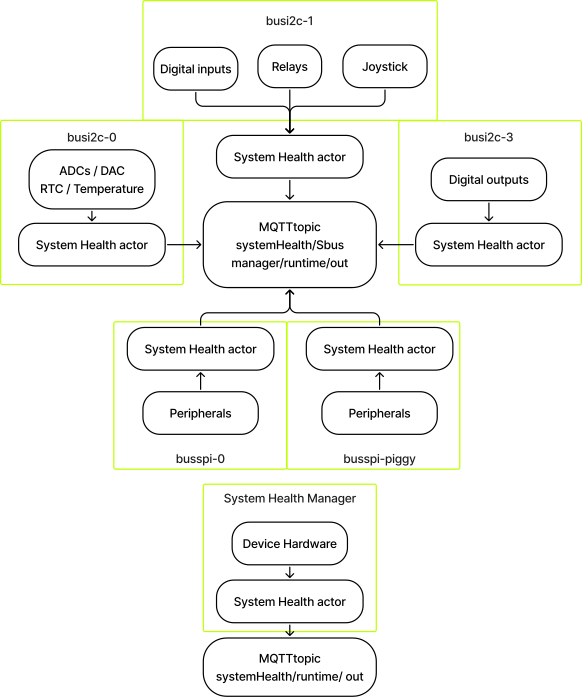
例
对于busi2c-0:
回答主题:systemHealth/busi2c-0/runtime/out
有效载荷:
{
"id": 1770378753024,
"origin": "system-health-busi2c-0",
"task": {
"taskResult": {
"ADC": {
"status": "ERROR",
"description": "IRQ Retrying",
"last\_report": 1770378753006,
"stats": {
"AI1": {
"samples": 563154,
"retries": 760548,
"discards": 253313
},
"AI2": {
"samples": 563154,
"retries": 760475,
"discards": 253314
},
"AI3": {
"samples": 563154,
"retries": 760528,
"discards": 253313
},
"AI4": {
"samples": 563154,
"retries": 760549,
"discards": 253312
}
}
},
"DAC": {
"status": "OK",
"description": "Running....",
"last\_report": 1770378752576,
"stats": {
"AO1": {
"samples": 240755,
"retries": 0,
"discards": 0
},
"AO2": {
"samples": 240755,
"retries": 0,
"discards": 0
}
}
},
"RTC": {
"status": "OK",
"description": "",
"last\_report": 1770378752094,
"stats": {
"samples": 248710,
"retries": 0,
"discards": 0
}
},
"TEMP": {
"status": "OK",
"description": "",
"last\_report": 1770378752579,
"stats": {
"samples": 240754,
"retries": 0,
"discards": 0
}
}
}
}
}
回答主题:systemHealth/busi2c-1/runtime/out
有效载荷:
{
"id": 1770382405107,
"origin": "system-health-busi2c-1",
"task": {
"taskResult": {
"JOYSTICK": {
"status": "OK",
"description": "Running....",
"last\_report": 1770382405050,
"stats": {
"read\_all": {
"samples": 410154,
"retries": 0,
"discards": 0
},
"read\_raw": {
"samples": 0,
"retries": 0,
"discards": 0
},
"buttons": {
"JDOWN": {
"reads": 410154,
"last\_state": "pressed"
},
"JRIGHT": {
"reads": 410154,
"last\_state": "pressed"
},
"JUP": {
"reads": 410154,
"last\_state": "pressed"
},
"JLEFT": {
"reads": 410154,
"last\_state": "pressed"
},
"JCENTER": {
"reads": 410154,
"last\_state": "pressed"
}
}
}
},
"RELAYS": {
"status": "OK",
"description": "Relay Output MQTT connected",
"last\_report": 1770298859099,
"stats": {
"read\_all": {
"samples": 0,
"retries": 0,
"discards": 0
},
"set": {
"samples": 0,
"retries": 0,
"discards": 0
},
"set\_many": {
"samples": 0,
"retries": 0,
"discards": 0
},
"raw\_read\_all": {
"samples": 0,
"retries": 0,
"discards": 0
}
},
"outputs": {
"DO1": {
"writes": 0,
"last\_state": "unknown"
},
"DO2": {
"writes": 0,
"last\_state": "unknown"
}
}
},
"DI": {
"status": "OK",
"description": "Running",
"last\_report": 1770382404832,
"stats": {
"read\_all": {
"samples": 181758,
"retries": 0,
"discards": 0
},
"read\_raw": {
"samples": 0,
"retries": 0,
"discards": 0
},
"inputs": {
"DI1": {
"reads": 181758,
"last\_state": "low"
},
"DI2": {
"reads": 181758,
"last\_state": "low"
},
"DI3": {
"reads": 181758,
"last\_state": "low"
},
"DI4": {
"reads": 181758,
"last\_state": "low"
}
}
}
}
}
}
}
温度传感器演员
应用界面
MQTT代理开放部分可用的用户应用界面和功能。简化的界面用于配置和接收外围数据。与该领域的经纪人建立联系无需信任投票。
温度传感器设置
必修主题:tempSensor/config/in
警报:
- 激活:true(active)/false
- 温度:警报温度下限
- 温度高:警报温度上限 回答主题:tempSensor/konfiguration/out(出) 阅读 ##### 温度传感器配置
必修主题:tempSensor/config/in
警报:
- 激活:true(active)/false
限制:
- 温度:警报温度下限
- 温度高:警报温度上限 回答主题:tempSensor/konfiguration/out(出)
查看温度和报警状态
- 单位:温度单位
- 警告:真(触发)或假
必修主题:tempSensor/运行时
回答主题:tempSensor/运行时/输出{
"id": "<TIMESTAMP>",
"origin": "APP",
"task": {
"taskResult": {
"success": true,
"data": {
"temperature": <\_FLOAT\_>,
"unit": "C",
"alert": true
}
}
}
}
TFT演员
应用界面
MQTT代理开放部分可用的用户应用界面和功能。简化的用户界面,用于控制和交互TFT显示屏或LCD前面板。该区域与经纪人的连接不需要任何访问数据。
TFT表演演员
TFT演员负责:
- 在TFT显示屏上渲染静态和信息性屏幕
- 试剂输入摇杆(左/右/中/上/下)
- 管理屏幕导航和用户确认流程
- 通过MQTT向应用提供反馈
屏幕旋转木马概念
TFT演员会保持一个有序的屏幕列表(旋转木马)。
- 屏幕通过操纵杆导航:
- 左 --上一个>
- 正确 --> 下一画面
- 旋转木马环绕:
- 第一个屏幕的左——>最后一个屏幕
- 正是在最后一个屏幕——>第一个屏幕
屏幕类型
TFT 演员支持以下屏幕类型:
a.)画面屏风
- 显示静态JPEG图像
- 启动时显示默认屏幕
- 无需用户交互
b.)网络信息界面
- 显示包含设备网络信息的接口
- 加载时更新
- 无需用户交互
摇杆导航逻辑
旋转木马导航:
| 摇杆输入 | 动作 |
| 链接 | 上一幕 |
| 确实如此 | 下一画面 |
| 下去 | 更新当前界面 |
启动行为
关于系统启动:
- TFT执行器初始化显示
- 最后可用的旋转木马已装载
- 第一屏渲染
- 将激活摇杆订阅
- 演员等待运行时命令
设计说明与局限性
- TFT演员不会自由显示摇杆状态
- 操纵杆演员保持独立
- TFT演员内部消耗摇杆事件
- 旋转木马州立大学是TFT演员的本地人
- 屏幕渲染是同步的;入门治疗是异步进行的
- 确认界面总是要求明确的中心打印
通过MQTT进行交互
通过主题 tft/runtime/in 与轮播交互。可用的操作对用户是公开的。
运行时命令
去屏幕前
必修主题:tft/runtime/in
{
"id": "<TIMESTAMP>",
"origin": "APP",
"task": {
"action": "SET\_CAROUSEL",
"params": {
"index": 2
}
}
}
{
"id": "TIMESTAMP",
"origin": "APP",
"task": {
"action": "SET\_CAROUSEL",
"params": {
"startIndex": 0,
"screens": \[
{
"type": "image",
"image": "default.jpg"
},
{
"type": "image",
"image": "status.jpg"
},
{
"type": "confirm",
"question": "Do you want to continue?"
}
\]
}
}
}
| 田野 | 描述 |
| 屏幕 | 屏幕顺序列表 |
| Home index(国家信息) | 初始活动界面(可选,默认 = 0) |
回答
回答主题:tft/片长/出局
{
"id": "TIMESTAMP",
"origin": "tft",
"task": {
"taskResult": {
"success": true,
"activeIndex": 0,
"totalScreens": 3
}
}
}
类比输入演员
应用界面
MQTT代理开放部分可用的用户应用界面和功能。简化的界面用于配置和接收外围数据。与该领域的经纪人建立联系无需信任投票。
配置
主题:模拟输入/接口/输入 – 设置ADC通道配置
模式
- 连续
- 单曲
类型
- 电压
- 现状 回答主题:模拟输入/配置/输出
运行时数据
主题:模拟输入/运行时/输入。
动作场面:
- 阅读
- 暂停(仅适用于连续模式)
- RESUME(仅适用于连续模式) 答案主题:模拟插入/运行时/关闭
模拟输出演员
应用界面
MQTT代理开放部分可用的用户应用界面和功能。简化的界面用于配置和接收外围数据。与该领域的经纪人建立联系无需信任投票。
模拟输出信号设置
目标主题:analogOutputs/config/in
输出: 电流范围在0-20 mA之间
模式: 开/关
{
"id": "<TIMESTAMP>",
"origin": "APP",
"task": {
"taskParams": {
"mode": "on",
"AO1": {
"current": <\_FLOAT\_>
},
"AO2": {
"current": <\_FLOAT\_>
}
}
}
}
{
"id": "<TIMESTAMP>",
"origin": "APP",
"task": {
"taskResult": {
"mode": "on",
"AO1": {
"success": true,
"current": <\_FLOAT\_>
},
"AO2": {
"success": true,
"current": <\_FLOAT\_>
}
}
}
}
模拟输出设置
要求主题:模拟开支/持续时间
电流: 电流在0-20毫安之间
{
"id": "<TIMESTAMP>",
"origin": "APP",
"task": {
"taskParams": {
"AO1": {
"action": "SET",
"current": <\_FLOAT\_>
},
"AO2": {
"action": "SET",
"current": <\_FLOAT\_>
}
}
}
}
{
"id": "<TIMESTAMP>",
"origin": "APP",
"task": {
"taskResult": {
"AO1": {
"success": true,
"current": <\_FLOAT\_>
},
"AO2": {
"success": true,
"current": <\_FLOAT\_>
}
}
}
}
读取模拟输出设置
要求主题:模拟开支/持续时间
电流:电流范围在0–20毫安之间
{
"id": "<TIMESTAMP>",
"origin": "APP",
"task": {
"taskParams": {
"AO1": {
"action": "READ"
},
"AO2": {
"action": "READ"
}
}
}
}
{
"id": "<TIMESTAMP>",
"origin": "APP",
"task": {
"taskResult": {
"AO1": {
"success": true,
"current": <\_FLOAT\_>
},
"AO2": {
"success": true,
"current": <\_FLOAT\_>
}
}
}
}
数字输入演员
应用界面
MQTT代理开放部分可用的用户应用界面和功能。简化的界面用于配置和接收外围数据。该区域与经纪人的连接不需要任何访问数据。
快速或缓慢调整数字输入引脚的速度
fast速度设置支持最高100 Hz的边缘检测,慢速度设置最高10 Hz。
快速模式每次输入输出状态变化时都会生成一条消息,这可能导致操作过程中高消息负载。因此,只有在绝对必要*的情况下才应启用快速模式。
前置主题:digitallnputs/config/in
{
"id": "<TIMESTAMP>",
"origin": "APP",
"task": {
"taskParams": {
"DI1": {
"speed": "fast"
},
"DI2": {
"speed": "slow"
},
"DI3": {
"speed": "fast"
},
"DI4": {
"speed": "fast"
}
}
}
}
{
"id": "<TIMESTAMP>",
"origin": "APP",
"task": {
"taskResult": {
"DI1": {
"success": true,
"speed": "fast"
},
"DI2": {
"success": true,
"speed": "slow"
},
"DI3": {
"success": true,
"speed": "fast"
},
"DI4": {
"success": true,
"speed": "fast"
}
}
}
}
获取所有数字输入引脚的状态。
目标主题:数字条目/运行时长
答案主题:数字输入/运行时/输出状态:高/低{
"id": "<TIMESTAMP>",
"origin": "APP",
"task": {
"taskResult": {
"DI1": {
"success": true,
"state": "high"
},
"DI2": {
"success": true,
"state": "low"
},
"DI3": {
"success": true,
"state": "high"
},
"DI4": {
"success": true,
"state": "low"
}
}
}
}
数字来源演员
应用界面
MQTT代理开放部分可用的用户应用界面和功能。简化的界面用于配置和接收外围数据。与该区域经纪人的联系无需任何信仰声明。
获取所有数字输出引脚的状态
需求主题:digitalOutputs/运行时/输入
答案主题:数字输出/运行时/输出{
"id": "<TIMESTAMP>",
"origin": "APP",
"task": {
"taskResult": {
"DO1": {
"success": true,
"state": "low"
},
"DO2": {
"success": true,
"state": "high"
},
"DO3": {
"success": true,
"state": "high"
},
"DO4": {
"success": true,
"state": "low"
},
"DO5": {
"success": true,
"state": "low"
},
"DO6": {
"success": true,
"state": "low"
},
"DO7": {
"success": true,
"state": "low"
},
"DO8": {
"success": true,
"state": "low"
}
}
}
}
设置所有数字输出引脚的状态
需求主题:digitalOutputs/运行时/输入
{
"id": "<TIMESTAMP>",
"origin": "APP",
"task": {
"taskParams": {
"DO1": {
"action": "SET",
"state": "low"
},
"DO2": {
"action": "SET",
"state": "high"
},
"DO3": {
"action": "SET",
"state": "high"
},
"DO4": {
"action": "SET",
"state": "low"
},
"DO5": {
"action": "SET",
"state": "low"
},
"DO6": {
"action": "SET",
"state": "low"
},
"DO7": {
"action": "SET",
"state": "low"
},
"DO8": {
"action": "SET",
"state": "low"
}
}
}
}
{
"id": "<TIMESTAMP>",
"origin": "APP",
"task": {
"taskResult": {
"D01": {
"success": true,
"state": "low"
},
"D02": {
"success": true,
"state": "high"
},
"D03": {
"success": true,
"state": "high"
},
"D04": {
"success": true,
"state": "high"
},
"D05": {
"success": true,
"state": "high"
},
"D06": {
"success": true,
"state": "low"
},
"D07": {
"success": true,
"state": "low"
},
"D08": {
"success": true,
"state": "low"
}
}
}
}
注释
如果Busi2c-3没有动力,我们将得到以下情况:
主题:段落a支出/期限/来源
{
"id": "<TIMESTAMP>",
"origin": "APP",
"task": {
"taskResult": {
"DO1": {
"success": false,
"state": "DO\_not\_powered"
},
"DO2": {
"success": false,
"state": "DO\_not\_powered"
},
"DO3": {
"success": false,
"state": "DO\_not\_powered"
},
"DO4": {
"success": false,
"state": "DO\_not\_powered"
},
"DO5": {
"success": false,
"state": "DO\_not\_powered"
},
"DO6": {
"success": false,
"state": "DO\_not\_powered"
},
"DO7": {
"success": false,
"state": "DO\_not\_powered"
},
"DO8": {
"success": false,
"state": "DO\_not\_powered"
}
}
}
}
操纵杆演员
应用界面
MQTT代理开放部分可用的用户应用界面和功能。简化的界面用于配置和接收外围数据。与该领域的经纪人建立联系无需信任投票。
把所有操纵杆销都装好
Req-Topic: joystick/runtime/in
{
  "id": "<TIMESTAMP>",
  "origin": "APP",
  "task": {
    "action": "READ"
  }
}
{
  "id": "<TIMESTAMP>",
  "origin": "APP",
  "task": {
    "taskResult": {
      "JLEFT": {
        "success": true,
        "state": "pressed"
      },
      "JRIGHT": {
        "success": true,
        "state": "released"
      },
      "JUP": {
        "success": true,
        "state": "released"
      },
      "JDOWN": {
        "success": true,
        "state": "released"
      },
      "JCENTER": {
        "success": true,
        "state": "released"
      }
    }
  }
}
包含软件栈
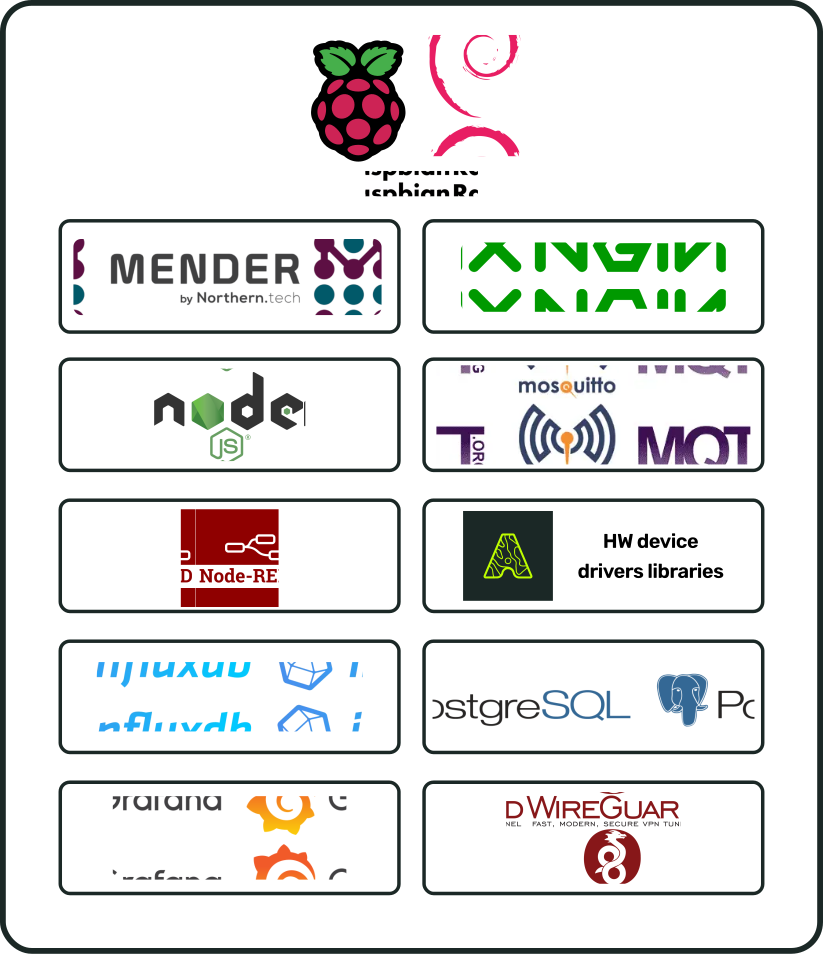
硬件库
[图片占位符]
相关产品
| **姓名 | 要求 | |
配饰
| **姓名 | 要求 | |
文档历史
| 版本 | 描述 | 日期 |
| SBADATAv0.1 | i.Cee² 数据表第一版 | 2026年11月3日 |
i.Cee² 在实地
[图片占位符]