Softwarespezifikationen
igus® smart plastics
Software und Codespezifikationen i.Cee²
Softwareinformationen
| Node-Red | Grafana | lnfluxDB | |
|---|---|---|---|
| Version | 4.1.4 | 12.3.1 | 2.8.0 |
| Port | 1880 | 3000 | 8086 |
| Zustand | Sauber | Sauber | Sauber |
| Authentifizierung | Keine | Benutzer/Pass (Admin/Admin) | Nicht definiert, beim ersten Anmelden der Schnittstelle konfiguriert. |
| GUI auf | http:// |
http:// |
http:// |
MQTT-Makler
Hafen: 1883
Adresse: AP-> 192.168.30.1
Eth1: 93.48.86.253
Benutzer: < nicht nötig>
Login
Relais gibt Akteur aus
App-Schnittstelle
Benutzer-App-Oberfläche und Funktionalitäten, die dem offenen Teil des MQTT-Brokers zur Verfügung stehen. Vereinfachte Schnittstelle zur Konfiguration und zum Erhalt von Peripheriedaten. Die Verbindung zum Makler für dieses Gebiet erfordert keine Zugangsdaten.
Einstellung/Zurücksetzen des digitalen Ausgangspins/Pin-Status
Beide Relais default Status ist offen.
Frage-Thema: relayOutputs/config/in
{
  "id": "<TIMESTAMP>",
  "origin": "APP",
  "task": {
    "taskParams": {
      "D01": {
        "state": "open"
      },
      "D02": {
        "state": "open"
      }
    }
  }
}
{
  "id": "<TIMESTAMP>",
  "origin": "APP",
  "task": {
    "taskResult": {
      "D01": {
        "success": true,
        "state": "open"
      },
      "D02": {
        "success": true,
        "state": "open"
      }
    }
  }
}
Alle Relais aktivieren
Anforderungsthema: relayOutputs/runtime/in
{
  "id": "<TIMESTAMP>",
  "origin": "APP",
  "task": {
    "action": "READ"
  }
}

Reply-Topic: relayOutputs/runtime/out

{
  "id": "<TIMESTAMP>",
  "origin": "APP",
  "task": {
    "taskResult": {
      "D01": {
        "success": true,
        "state": "open"
      },
      "D02": {
        "success": true,
        "state": "close"
      }
    }
  }
}
Setze den Zustand aller Relais
Anforderungsthema: relayOutputs/runtime/in
{
  "id": "<TIMESTAMP>",
  "origin": "APP",
  "task": {
    "action": "SET",
    "taskParams": {
      "D01": {
        "state": "open"
      },
      "D02": {
        "state": "close"
      }
    }
  }
}
{
  "id": "<TIMESTAMP>",
  "origin": "APP",
  "task": {
    "taskResult": {
      "D01": {
        "success": true,
        "state": "open"
      },
      "D02": {
        "success": true,
        "state": "close"
      }
    }
  }
}
RTC-Schauspieler
App-Schnittstelle
Benutzer-App-Oberfläche und Funktionalitäten, die dem offenen Teil des MQTT-Brokers zur Verfügung stehen. Vereinfachte Schnittstelle zur Konfiguration und zum Erhalt von Peripheriedaten. Die Verbindung zum Makler für dieses Gebiet erfordert keine Vertrauensbeweis.
Timer/Weckerunterbrechung stellen
Modus: Timer, Alarm oder nicht.
alarmSet: Datum und Uhrzeit für Alarmunterbrechung (Keine Auswirkung, ob der Modus Timer ist oder nicht).
timerSetSeconds: Periode in Sekunden für Timer-Unterbrechung (kein Effekt, ob der Modus Alarm ist oder nicht).
Wunsch-Thema: Takt/Konfiguration/Einstellung
{
  "id": "<TIMESTAMP>",
  "origin": "APP",
  "task": {
    "taskParams": {
      "CLOCK\_SET\_MODE": {
        "mode": "timer",
        "alarmSet": "\[timestamp epoch ms\]",
        "timerSetSeconds": "<INT>"
      }
    }
  }
}
{
  "id": "<TIMESTAMP>",
  "origin": "APP",
  "task": {
    "taskResult": {
      "success": true,
      "CLOCK\_SET\_MODE": {
        "mode": "timer",
        "alarmSet": "\[timestamp epoch ms\]",
        "timerSetSeconds": "<INT>"
      }
    }
  }
}
RTC-Synchronisationslogik umschalten (unten beschrieben)
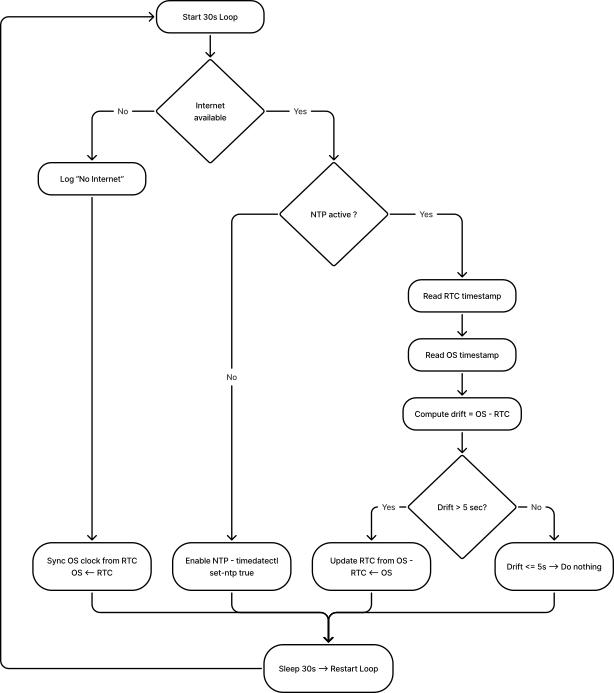
tcState: Zustand der Synchronisationslogik des RTC, dieser Wert ist nicht persistent, sodass bei jedem Neustart der Wert auf den Standard zurückkehrt (standardmäßig ist der Wert AN)
Wunsch-Thema: Takt/Konfiguration/Einstellung
{
  "id": "<TIMESTAMP>",
  "origin": "APP",
  "task": {
    "action": "TOGGLE"
  }
}

Req-Topic: clock/config/out

{
  "id": "<TIMESTAMP>",
  "origin": "APP",
  "task": {
    "taskResult": {
      "success": true,
      "rtcState": "OFF"
    }
  }
}
Read-Takt-Konfigurationen
Modus: Timer, Alarm oder nicht.
alarmSet: Datum und Uhrzeit für Alarmunterbrechung (Keine Auswirkung, ob der Modus Timer ist oder nicht).
timerSetSeconds: Periode in Sekunden für Timer-Unterbrechung (kein Effekt, ob der Modus Alarm ist oder nicht).
rtcState: Aktueller Zustand der Synchronisationslogik des RTC.
Wunsch-Thema: Takt/Konfiguration/Einstellung
Antwort-Thema: Uhr/Konfiguration/Aus{
"id": "<TIMESTAMP>",
"origin": "APP",
"task": {
"taskResult": {
"success": true,
"CLOCK\_CONFIGS": {
"mode": "timer",
"alarmSet": "\[timestamp epoch ms\]",
"timerSetSeconds": "<INT>",
"rtcState": "ON"
}
}
}
}
Lese-Uhr
Bedarf-Thema: Uhr/Laufzeit/In-Phase
{
"id": "<TIMESTAMP>",
"origin": "APP",
"task": {
"taskResult": {
"success": true,
"timestamp": "\[timestamp epoch ms\]"
}
}
}
Synchronisationsschleifen-Flussdiagramm (alle 30 Sekunden)
RTC Actor – Überblick
Kernsystem-Gesundheitsakteur
App-Schnittstelle
Benutzer-App-Oberfläche und Funktionalitäten, die dem offenen Teil des MQTT-Brokers zur Verfügung stehen.
Diese Schnittstelle ermöglicht es jeder externen App, Systemmetriken wie CPU-Last, RAM-Auslastung, Festplattenauslastung, Temperatur, Kernfrequenz, System-Drosselstatus und Verfügbarkeit zu empfangen. Für das Abonnement dieses Themas sind keine Qualifikationen erforderlich. Der System Health Actor erhält keine Befehle. Es ist vollkommen autonom und veröffentlicht seine Kennzahlen alle 1 Sekunde.
Laufzeitdaten
Thema: SystemHea l th/Laufzeit/ aus
Veröffentlichungsrate: 1 Hz (eine Nachricht pro Sekunde, Clock-Jump sicher)
bereitgestellte Kennzahlen
| Schlüssel | Beschreibung | Einheit |
|---|---|---|
| cpu_percent | Aktuelle CPU-Last | % |
| cpu_tempC | CPU-Temperatur aus Linux-Thermalzonen abgelesen | ºC |
| cpu0_freq | CPU-Kern O-Stromfrequenz | Hz |
| cpul_freq | CPU-Kern 1 Stromfrequenz | Hz |
| cpu2_freq | CPU Core 2 Stromfrequenz | Hz |
| cpu3_freq | CPU-Kern 3 Stromfrequenz | Hz |
| cpu0_throttle | System-Throttle-Statusregister | Hex |
| Ram_percent | RAM-Nutzung | % |
| disk_percent | Festplattennutzung für Dateisystem-Root / | % |
| Uptime_sec\ | Zeit seit dem letzten Neustart | Sekunden |
Beispiel Payload (systemHealth/runtime/out)
{ "id": 1736022028123, "Ursprung": "System-Gesundheit", "Aufgabe": { "taskResult": { "cpu_percent": 7,1, "cpu_tempC": 47,3, "cpu0_freq": 15000000000, "cpu1_freq": 15000000000, "cpu2_freq": 15000000000, "cpu3_freq": 1500000000, "cpu0_throttle": "0x0", "Ram_percent": 32,9, "disk_percent\": 41.2, "Uptime_sec": 5321 } } }
Gesundheit der peripheren Geräte
Um die Gesundheit der Peripheriegeräte zu erhalten, mussten wir in jedem Busmanager einen SystemHealth-Akteur implementieren (busi2cO, busi2c-1 usw.).
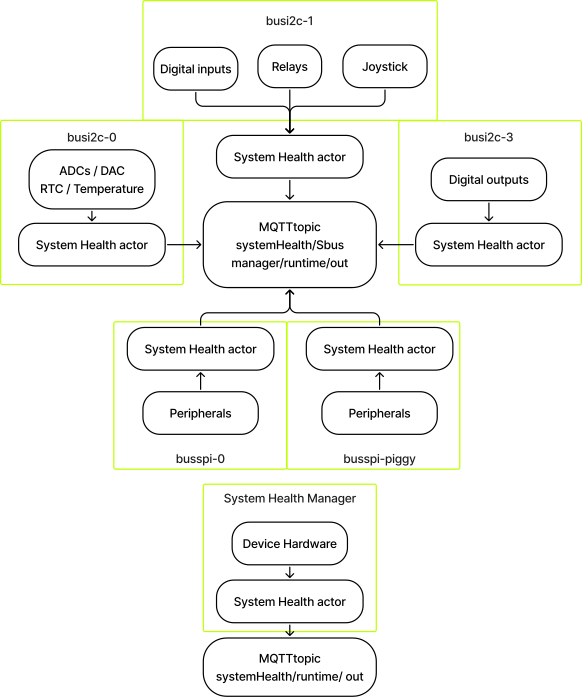
Beispiel
Für busi2c-0:
Antwortthema: systemHealth/busi2c-0/runtime/out
Nutzlast:
{
"id": 1770378753024,
"origin": "system-health-busi2c-0",
"task": {
"taskResult": {
"ADC": {
"status": "ERROR",
"description": "IRQ Retrying",
"last\_report": 1770378753006,
"stats": {
"AI1": {
"samples": 563154,
"retries": 760548,
"discards": 253313
},
"AI2": {
"samples": 563154,
"retries": 760475,
"discards": 253314
},
"AI3": {
"samples": 563154,
"retries": 760528,
"discards": 253313
},
"AI4": {
"samples": 563154,
"retries": 760549,
"discards": 253312
}
}
},
"DAC": {
"status": "OK",
"description": "Running....",
"last\_report": 1770378752576,
"stats": {
"AO1": {
"samples": 240755,
"retries": 0,
"discards": 0
},
"AO2": {
"samples": 240755,
"retries": 0,
"discards": 0
}
}
},
"RTC": {
"status": "OK",
"description": "",
"last\_report": 1770378752094,
"stats": {
"samples": 248710,
"retries": 0,
"discards": 0
}
},
"TEMP": {
"status": "OK",
"description": "",
"last\_report": 1770378752579,
"stats": {
"samples": 240754,
"retries": 0,
"discards": 0
}
}
}
}
}
Antwortthema: systemHealth/busi2c-1/runtime/out
Nutzlast:
{
"id": 1770382405107,
"origin": "system-health-busi2c-1",
"task": {
"taskResult": {
"JOYSTICK": {
"status": "OK",
"description": "Running....",
"last\_report": 1770382405050,
"stats": {
"read\_all": {
"samples": 410154,
"retries": 0,
"discards": 0
},
"read\_raw": {
"samples": 0,
"retries": 0,
"discards": 0
},
"buttons": {
"JDOWN": {
"reads": 410154,
"last\_state": "pressed"
},
"JRIGHT": {
"reads": 410154,
"last\_state": "pressed"
},
"JUP": {
"reads": 410154,
"last\_state": "pressed"
},
"JLEFT": {
"reads": 410154,
"last\_state": "pressed"
},
"JCENTER": {
"reads": 410154,
"last\_state": "pressed"
}
}
}
},
"RELAYS": {
"status": "OK",
"description": "Relay Output MQTT connected",
"last\_report": 1770298859099,
"stats": {
"read\_all": {
"samples": 0,
"retries": 0,
"discards": 0
},
"set": {
"samples": 0,
"retries": 0,
"discards": 0
},
"set\_many": {
"samples": 0,
"retries": 0,
"discards": 0
},
"raw\_read\_all": {
"samples": 0,
"retries": 0,
"discards": 0
}
},
"outputs": {
"DO1": {
"writes": 0,
"last\_state": "unknown"
},
"DO2": {
"writes": 0,
"last\_state": "unknown"
}
}
},
"DI": {
"status": "OK",
"description": "Running",
"last\_report": 1770382404832,
"stats": {
"read\_all": {
"samples": 181758,
"retries": 0,
"discards": 0
},
"read\_raw": {
"samples": 0,
"retries": 0,
"discards": 0
},
"inputs": {
"DI1": {
"reads": 181758,
"last\_state": "low"
},
"DI2": {
"reads": 181758,
"last\_state": "low"
},
"DI3": {
"reads": 181758,
"last\_state": "low"
},
"DI4": {
"reads": 181758,
"last\_state": "low"
}
}
}
}
}
}
}
TempSensor-Akteur
App-Schnittstelle
Benutzer-App-Oberfläche und Funktionalitäten, die dem offenen Teil des MQTT-Brokers zur Verfügung stehen. Vereinfachte Schnittstelle zur Konfiguration und zum Erhalt von Peripheriedaten. Die Verbindung zum Makler für dieses Gebiet erfordert keine Vertrauensbeweis.
Einstellungen der Temperatursensoren
Erforderlich-Thema: tempSensor/config/in
ALARM:
- aktivieren: wahr(aktiv)/falsch
- Temperatur: Alarmtemperatur untere Grenze
- TemperaturHöchst: Alarmtemperatur Obergrenze Antwort-Thema: tempSensor/konfiguration/out
Temperatursensorkonfigurationen lesen
Erforderlich-Thema: tempSensor/config/in
ALARM:
- aktivieren: wahr(aktiv)/falsch
GRENZEN:
- Temperatur: Alarmtemperatur untere Grenze
- TemperaturHöchst: Alarmtemperatur Obergrenze Antwort-Thema: tempSensor/konfiguration/out
Temperatur und Alarmstatus anzeigen
- Einheit: Temperaturmaßeinheit
- Warnung: wahr (ausgelöst) oder falsch
Erforderliches Thema: tempSensor/Laufzeit/in
Antwort-Thema: tempSensor/runtime/out{
"id": "<TIMESTAMP>",
"origin": "APP",
"task": {
"taskResult": {
"success": true,
"data": {
"temperature": <\_FLOAT\_>,
"unit": "C",
"alert": true
}
}
}
}
TFT-Schauspieler
App-Schnittstelle
Benutzer-App-Oberfläche und Funktionalitäten, die dem offenen Teil des MQTT-Brokers zur Verfügung stehen. Vereinfachte Benutzeroberfläche zur Steuerung und Interaktion mit dem TFT-Display oder dem LCD-Frontpanel. Die Verbindung zum Makler für dieses Gebiet erfordert keine Zugangsdaten.
TFT-Anzeige-Akteur
Der TFT-Akteur ist verantwortlich für:
- Rendering statischer und informativer Bildschirme auf der TFT-Anzeige
- Reagenz auf Joystick-Eingabe (LINKS/ RECHTS/ ZENTRIERT/ HOCH/ RUNTER)
- Verwaltung der Bildschirmnavigation und der Benutzerbestätigungsflüsse
- Feedback an die Anwendung über MQTT geben
Screen-Karussell-Konzept
Der TFT-Schauspieler führt eine geordnete Liste von Bildschirmen (Karussell).
- Die Bildschirme werden mit dem Joystick navigiert:
- LINKS --> Vorheriger Bildschirm
- RICHTIG --> Nächster Bildschirm
- Das Karussell wickelt sich um:
- LINKS auf dem ersten Bildschirm --> letzter Bildschirm
- GENAU auf dem letzten Bildschirm --> ersten Bildschirm
Bildschirmtypen
Der TFT-Akteur unterstützt folgende Bildschirmtypen:
a.) Bildbildschirm
- Zeigt ein statisches JPEG-Bild an
- Standardbildschirm wird beim Start angezeigt
- Keine Benutzerinteraktion erforderlich
b.) Netzwerkinformationsbildschirm
- Anzeige einer Schnittstelle mit Informationen über die Netzwerke des Geräts
- Aktualisiert beim Laden
- Keine Benutzerinteraktion erforderlich
Joystick-Navigationslogik
Karussellnavigation:
| Joystick-Eingabe | Action |
| LINKS | Vorheriger Bildschirm |
| RICHTIG | Nächster Bildschirm |
| RUNTER | Aktuellen Bildschirm aktualisieren |
Bootverhalten
Beim Systemboot:
- Der TFT-Aktor initialisiert die Anzeige
- Das zuletzt verfügbare Karussell ist geladen
- Der erste Bildschirm wird gerendert
- Joystick-Abonnements werden aktiviert
- Der Actor wartet auf Laufzeitbefehle
Designhinweise und Einschränkungen
- TFT-Akteur zeigt den Joystick-Zustand nicht frei
- Joystick-Schauspieler bleibt unabhängig
- TFT-Akteur konsumiert intern Joystick-Ereignisse
- Carousel State ist lokal für den TFT-Akteur
- Das Screenrendering erfolgt synchron; Die Eingangsbehandlung erfolgt asynchron
- Bestätigungsbildschirme erfordern immer expliziten CENTER-Druck
Interaktion über MQTT
Ermöglichung der Interaktion mit dem Karussell über das Thema tft/runtime/in . Verfügbare Aktionen sind für den Nutzer öffentlich.
Laufzeitbefehle
Geh auf den Bildschirm
Erforderliches Thema: tft/runtime/in
{
"id": "<TIMESTAMP>",
"origin": "APP",
"task": {
"action": "SET\_CAROUSEL",
"params": {
"index": 2
}
}
}
{
"id": "TIMESTAMP",
"origin": "APP",
"task": {
"action": "SET\_CAROUSEL",
"params": {
"startIndex": 0,
"screens": \[
{
"type": "image",
"image": "default.jpg"
},
{
"type": "image",
"image": "status.jpg"
},
{
"type": "confirm",
"question": "Do you want to continue?"
}
\]
}
}
}
| Feld | Beschreibung |
| Bildschirme | Geordnete Liste der Bildschirme |
| Start lndex | Initialer aktiver Bildschirm (optional, Standard = 0) |
Antwort
Antwortthema: tft/runtime/out
{
"id": "TIMESTAMP",
"origin": "tft",
"task": {
"taskResult": {
"success": true,
"activeIndex": 0,
"totalScreens": 3
}
}
}
Analoglnputs Actor
App-Schnittstelle
Benutzer-App-Oberfläche und Funktionalitäten, die dem offenen Teil des MQTT-Brokers zur Verfügung stehen. Vereinfachte Schnittstelle zur Konfiguration und zum Erhalt von Peripheriedaten. Die Verbindung zum Makler für dieses Gebiet erfordert keine Vertrauensbeweis.
Konfigurationen
Thema: analoglnputs/konfiguration/in – ADC-Kanalkonfigurationen einstellen
Modus
- kontinuierlich
- Single
typ
- Spannung
- aktuell Antwort-Thema: analoglnputs/config/out
Laufzeitdaten
Thema: analoge Eingaben/Laufzeit/In.
Aktion:
- LESEN
- PAUSE (nur im kontinuierlichen Modus anwendbar)
- RESUME (nur im kontinuierlichen Modus anwendbar) Antwort-Thema: analoge Einsätze/Laufzeit/Aus
Analoger Ausgangsakteur
App-Schnittstelle
Benutzer-App-Oberfläche und Funktionalitäten, die dem offenen Teil des MQTT-Brokers zur Verfügung stehen. Vereinfachte Schnittstelle zur Konfiguration und zum Erhalt von Peripheriedaten. Die Verbindung zum Makler für dieses Gebiet erfordert keine Vertrauensbeweis.
Analogausgangssignal einstellen
Wunsch-Thema: analogOutputs/config/in
Ausgang: Strom innerhalb von 0–20 mA
Modus: Ein/Aus
{
"id": "<TIMESTAMP>",
"origin": "APP",
"task": {
"taskParams": {
"mode": "on",
"AO1": {
"current": <\_FLOAT\_>
},
"AO2": {
"current": <\_FLOAT\_>
}
}
}
}
{
"id": "<TIMESTAMP>",
"origin": "APP",
"task": {
"taskResult": {
"mode": "on",
"AO1": {
"success": true,
"current": <\_FLOAT\_>
},
"AO2": {
"success": true,
"current": <\_FLOAT\_>
}
}
}
}
Analoge Ausgänge einstellen
Erfordernis-Thema: analogAusgaben/Laufzeit/in
Strom: Strom innerhalb von 0-20 mA
{
"id": "<TIMESTAMP>",
"origin": "APP",
"task": {
"taskParams": {
"AO1": {
"action": "SET",
"current": <\_FLOAT\_>
},
"AO2": {
"action": "SET",
"current": <\_FLOAT\_>
}
}
}
}
{
"id": "<TIMESTAMP>",
"origin": "APP",
"task": {
"taskResult": {
"AO1": {
"success": true,
"current": <\_FLOAT\_>
},
"AO2": {
"success": true,
"current": <\_FLOAT\_>
}
}
}
}
Analogausgänge-Einstellungen lesen
Erfordernis-Thema: analogAusgaben/Laufzeit/in
Strom: Strom innerhalb von 0–20 mA
{
"id": "<TIMESTAMP>",
"origin": "APP",
"task": {
"taskParams": {
"AO1": {
"action": "READ"
},
"AO2": {
"action": "READ"
}
}
}
}
{
"id": "<TIMESTAMP>",
"origin": "APP",
"task": {
"taskResult": {
"AO1": {
"success": true,
"current": <\_FLOAT\_>
},
"AO2": {
"success": true,
"current": <\_FLOAT\_>
}
}
}
}
Digital Input Actor
App-Schnittstelle
Benutzer-App-Oberfläche und Funktionalitäten, die dem offenen Teil des MQTT-Brokers zur Verfügung stehen. Vereinfachte Schnittstelle zur Konfiguration und zum Erhalt von Peripheriedaten. Die Verbindung zum Makler für dieses Gebiet erfordert keine Zugangsdaten.
Stelle die Geschwindigkeit der digitalen Eingabepins/Pins schnell/langsam ein
Die schnelle Geschwindigkeitseinstellung unterstützt Kantenerkennung bis zu 100 Hz und die langsame Geschwindigkeitseinstellung bis zu 10 Hz.
Der Schnellmodus erzeugt bei jeder Änderung des I/O-Zustands eine Nachricht, was während des Betriebs zu einer hohen Nachrichtennutzlast führen kann. Der Schnellmodus sollte daher nur aktiviert werden, wenn unbedingt erforderlich ist.
Voraussetzungsthema: digitallnputs/config/in
{
"id": "<TIMESTAMP>",
"origin": "APP",
"task": {
"taskParams": {
"DI1": {
"speed": "fast"
},
"DI2": {
"speed": "slow"
},
"DI3": {
"speed": "fast"
},
"DI4": {
"speed": "fast"
}
}
}
}
{
"id": "<TIMESTAMP>",
"origin": "APP",
"task": {
"taskResult": {
"DI1": {
"success": true,
"speed": "fast"
},
"DI2": {
"success": true,
"speed": "slow"
},
"DI3": {
"success": true,
"speed": "fast"
},
"DI4": {
"success": true,
"speed": "fast"
}
}
}
}
Erhalte den Zustand aller digitalen Eingabepins.
Wunsch-Thema: digitale Eingaben/Laufzeit/in
Antwort-Thema: digitaleInputs/Laufzeit/Out-Zustand: hoch/niedrig{
"id": "<TIMESTAMP>",
"origin": "APP",
"task": {
"taskResult": {
"DI1": {
"success": true,
"state": "high"
},
"DI2": {
"success": true,
"state": "low"
},
"DI3": {
"success": true,
"state": "high"
},
"DI4": {
"success": true,
"state": "low"
}
}
}
}
Digitaler Ausgangsakteur
App-Schnittstelle
Benutzer-App-Oberfläche und Funktionalitäten, die dem offenen Teil des MQTT-Brokers zur Verfügung stehen. Vereinfachte Schnittstelle zur Konfiguration und zum Erhalt von Peripheriedaten. Die Verbindung zum Makler für dieses Gebiet erfordert keine Glaubenserklärungen.
Erhalten Sie den Zustand aller digitalen Ausgangspins
Anforderungsthema: digitalOutputs/Runtime/in
Antwort-Thema: digitalOutputs/Runtime/out{
"id": "<TIMESTAMP>",
"origin": "APP",
"task": {
"taskResult": {
"DO1": {
"success": true,
"state": "low"
},
"DO2": {
"success": true,
"state": "high"
},
"DO3": {
"success": true,
"state": "high"
},
"DO4": {
"success": true,
"state": "low"
},
"DO5": {
"success": true,
"state": "low"
},
"DO6": {
"success": true,
"state": "low"
},
"DO7": {
"success": true,
"state": "low"
},
"DO8": {
"success": true,
"state": "low"
}
}
}
}
Setze den Zustand aller digitalen Ausgangspins
Anforderungsthema: digitalOutputs/Runtime/in
{
"id": "<TIMESTAMP>",
"origin": "APP",
"task": {
"taskParams": {
"DO1": {
"action": "SET",
"state": "low"
},
"DO2": {
"action": "SET",
"state": "high"
},
"DO3": {
"action": "SET",
"state": "high"
},
"DO4": {
"action": "SET",
"state": "low"
},
"DO5": {
"action": "SET",
"state": "low"
},
"DO6": {
"action": "SET",
"state": "low"
},
"DO7": {
"action": "SET",
"state": "low"
},
"DO8": {
"action": "SET",
"state": "low"
}
}
}
}
{
"id": "<TIMESTAMP>",
"origin": "APP",
"task": {
"taskResult": {
"D01": {
"success": true,
"state": "low"
},
"D02": {
"success": true,
"state": "high"
},
"D03": {
"success": true,
"state": "high"
},
"D04": {
"success": true,
"state": "high"
},
"D05": {
"success": true,
"state": "high"
},
"D06": {
"success": true,
"state": "low"
},
"D07": {
"success": true,
"state": "low"
},
"D08": {
"success": true,
"state": "low"
}
}
}
}
Anmerkungen
Wenn der Busi2c-3 nicht mit Strom versorgt ist, erhalten wir Folgendes:
Thema: Ziffer a lAusgaben/Laufzeit/aus
{
"id": "<TIMESTAMP>",
"origin": "APP",
"task": {
"taskResult": {
"DO1": {
"success": false,
"state": "DO\_not\_powered"
},
"DO2": {
"success": false,
"state": "DO\_not\_powered"
},
"DO3": {
"success": false,
"state": "DO\_not\_powered"
},
"DO4": {
"success": false,
"state": "DO\_not\_powered"
},
"DO5": {
"success": false,
"state": "DO\_not\_powered"
},
"DO6": {
"success": false,
"state": "DO\_not\_powered"
},
"DO7": {
"success": false,
"state": "DO\_not\_powered"
},
"DO8": {
"success": false,
"state": "DO\_not\_powered"
}
}
}
}
Joystick-Schauspieler
App-Schnittstelle
Benutzer-App-Oberfläche und Funktionalitäten, die dem offenen Teil des MQTT-Brokers zur Verfügung stehen. Vereinfachte Schnittstelle zur Konfiguration und zum Erhalt von Peripheriedaten. Die Verbindung zum Makler für dieses Gebiet erfordert keine Vertrauensbeweis.
Alle Joystick-Pins in den Zustand bringen
Req-Topic: joystick/runtime/in
{
  "id": "<TIMESTAMP>",
  "origin": "APP",
  "task": {
    "action": "READ"
  }
}
{
  "id": "<TIMESTAMP>",
  "origin": "APP",
  "task": {
    "taskResult": {
      "JLEFT": {
        "success": true,
        "state": "pressed"
      },
      "JRIGHT": {
        "success": true,
        "state": "released"
      },
      "JUP": {
        "success": true,
        "state": "released"
      },
      "JDOWN": {
        "success": true,
        "state": "released"
      },
      "JCENTER": {
        "success": true,
        "state": "released"
      }
    }
  }
}
Enthaltener Software-Stack
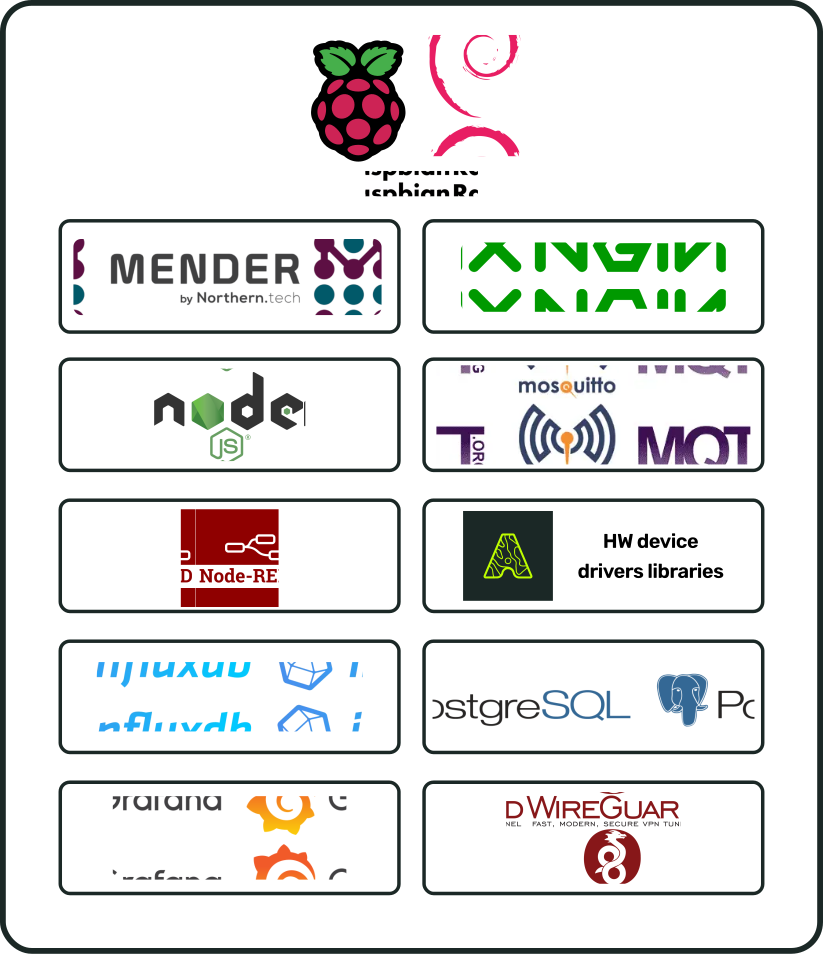
Hardware-Bibliotheken
[BILD-PLATZHALTER]
Verwandte Produkte
| PA | Name | Anforderungen |
Zubehör
| PA | Name | Anforderungen |
Dokumentengeschichte
| Version | Beschreibung | Datum |
| SBADATAv0.1 | Erste Version des i.Cee²-Datenblatts | 03.11.2026 |
i.Cee² im Feld
[BILD-PLATZHALTER]