Softwarespezifikationen
igus® smart plastics
Software and code specifications i.Cee²
Software Information
| Node-Red | Grafana | lnfluxDB | |
|---|---|---|---|
| Version | 4.1.4 | 12.3.1 | 2.8.0 |
| Port | 1880 | 3000 | 8086 |
| Condition | Clean | Clean | Clean |
| Authentication | None | User/Pass (Admin/Admin) | Undefined, configured the first time the interface is logged in. |
| GUI on | http:// |
http:// |
http:// |
MQTT Broker
Port: 1883
Address: AP-> 192.168.30.1
Eth1: 93.48.86.253
User: < not necessary>
Login
Relay outputs actor
App Interface
User app interface and functionalities available to the open part of the MQTT broker. Simplified interface for configuring and receiving peripheral data. The connection to the broker for this area does not require any access data.
Setting/resetting the digital output pin/pin status
Both relays default status is open.
Question topic: relayOutputs/config/in
{
  "id": "<TIMESTAMP>",
  "origin": "APP",
  "task": {
    "taskParams": {
      "D01": {
        "state": "open"
      },
      "D02": {
        "state": "open"
      }
    }
  }
}
{
  "id": "<TIMESTAMP>",
  "origin": "APP",
  "task": {
    "taskResult": {
      "D01": {
        "success": true,
        "state": "open"
      },
      "D02": {
        "success": true,
        "state": "open"
      }
    }
  }
}
Activate all relays
Request topic: relayOutputs/runtime/in
{
  "id": "<TIMESTAMP>",
  "origin": "APP",
  "task": {
    "action": "READ"
  }
}

Reply-Topic: relayOutputs/runtime/out

{
  "id": "<TIMESTAMP>",
  "origin": "APP",
  "task": {
    "taskResult": {
      "D01": {
        "success": true,
        "state": "open"
      },
      "D02": {
        "success": true,
        "state": "close"
      }
    }
  }
}
Set the state of all relays
Request topic: relayOutputs/runtime/in
{
  "id": "<TIMESTAMP>",
  "origin": "APP",
  "task": {
    "action": "SET",
    "taskParams": {
      "D01": {
        "state": "open"
      },
      "D02": {
        "state": "close"
      }
    }
  }
}
{
  "id": "<TIMESTAMP>",
  "origin": "APP",
  "task": {
    "taskResult": {
      "D01": {
        "success": true,
        "state": "open"
      },
      "D02": {
        "success": true,
        "state": "close"
      }
    }
  }
}
RTC Actor
App Interface
User app interface and functionalities available to the open part of the MQTT broker. Simplified interface for configuring and receiving peripheral data. The connection to the broker for this area does not require a vote of confidence.
Set timer/alarm clock interruption
Mode: Timer, alarm or not.
alarmSet: Date and time for alarm interruption (No effect whether the mode is timer or not).
timerSetSeconds: Period in seconds for timer interruption (no effect whether the mode is alarm or not).
Desired topic: Clock/Configuration/Setting
{
  "id": "<TIMESTAMP>",
  "origin": "APP",
  "task": {
    "taskParams": {
      "CLOCK\_SET\_MODE": {
        "mode": "timer",
        "alarmSet": "\[timestamp epoch ms\]",
        "timerSetSeconds": "<INT>"
      }
    }
  }
}
{
  "id": "<TIMESTAMP>",
  "origin": "APP",
  "task": {
    "taskResult": {
      "success": true,
      "CLOCK\_SET\_MODE": {
        "mode": "timer",
        "alarmSet": "\[timestamp epoch ms\]",
        "timerSetSeconds": "<INT>"
      }
    }
  }
}
Toggle RTC synchronization logic (described below)
tcState: State of the synchronization logic of the RTC, this value is non-persistent, so on each reboot the value reverts to the default (by default, the value is ON)
Desired topic: Clock/Configuration/Setting
{
  "id": "<TIMESTAMP>",
  "origin": "APP",
  "task": {
    "action": "TOGGLE"
  }
}

Req-Topic: clock/config/out

{
  "id": "<TIMESTAMP>",
  "origin": "APP",
  "task": {
    "taskResult": {
      "success": true,
      "rtcState": "OFF"
    }
  }
}
read-clock configurations
Mode: Timer, alarm or not.
alarmSet: Date and time for alarm interruption (No effect whether the mode is timer or not).
timerSetSeconds: Period in seconds for timer interruption (no effect whether the mode is alarm or not).
rtcState: Current state of the RTC's synchronization logic.
Desired topic: Clock/Configuration/Setting
Answer Topic: Clock/Configuration/Off{
"id": "<TIMESTAMP>",
"origin": "APP",
"task": {
"taskResult": {
"success": true,
"CLOCK\_CONFIGS": {
"mode": "timer",
"alarmSet": "\[timestamp epoch ms\]",
"timerSetSeconds": "<INT>",
"rtcState": "ON"
}
}
}
}
Reading Clock
Demand Topic: Clock/Runtime/In-Phase
{
"id": "<TIMESTAMP>",
"origin": "APP",
"task": {
"taskResult": {
"success": true,
"timestamp": "\[timestamp epoch ms\]"
}
}
}
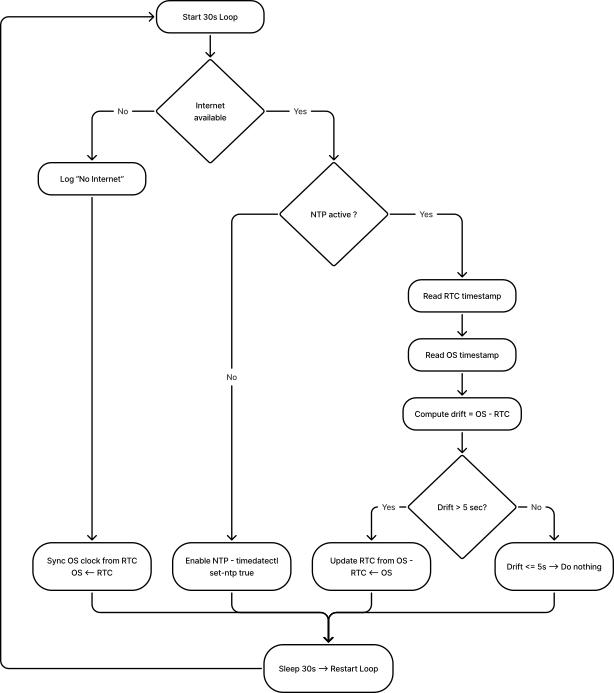
Synchronization loop flowchart (every 30 seconds)
RTC Actor – Overview
Core System Health Actor
App Interface
User app interface and functionalities available to the open part of the MQTT broker.
This interface allows any external app to receive system metrics such as CPU load, RAM usage, disk usage, temperature, core frequency, system throttling status, and availability. No qualifications are required to subscribe to this topic. The System Health Actor does not receive any commands. It is completely autonomous and publishes its metrics every 1 second.
Runtime data
Topic: SystemHea l th/Runtime/ off
Release rate: 1 Hz (one message per second, clock jump for sure)
metrics provided
| Keys | Description | Unit |
|---|---|---|
| CPU_percent | Current CPU Load | % |
| CPU_tempC | CPU temperature read from Linux thermal zones | ºC |
| cpu0_freq | CPU Core O Current Frequency | Hz |
| cpul_freq | CPU Core 1 Power Frequency | Hz |
| cpu2_freq | CPU Core 2 Power Frequency | Hz |
| CPU3_freq | CPU Core 3 Power Frequency | Hz |
| CPU0_throttle | System Throttle Status Registry | Hex |
| Ram_percent | RAM Usage | % |
| disk_percent | Disk Usage for File System Root / | % |
| Uptime_sec\ | Time since the last restart | Seconds |
Example Payload (systemHealth/runtime/out)
{ "id": 1736022028123, "Origin": "System Health", "Task": { "taskResult": { "cpu_percent": 7.1, "CPU_tempC": 47.3, "CPU0_freq": 15000000000, "CPU1_freq": 15000000000, "CPU2_freq": 15000000000, "CPU3_freq": 1500000000, "cpu0_throttle": "0x0", "Ram_percent": 32.9, "disk_percent\": 41.2, "Uptime_sec": 5321 } } }
Peripheral Device Health
To maintain the health of the peripherals, we had to implement a SystemHealth actor in each bus manager (busi2cO, busi2c-1, etc.).
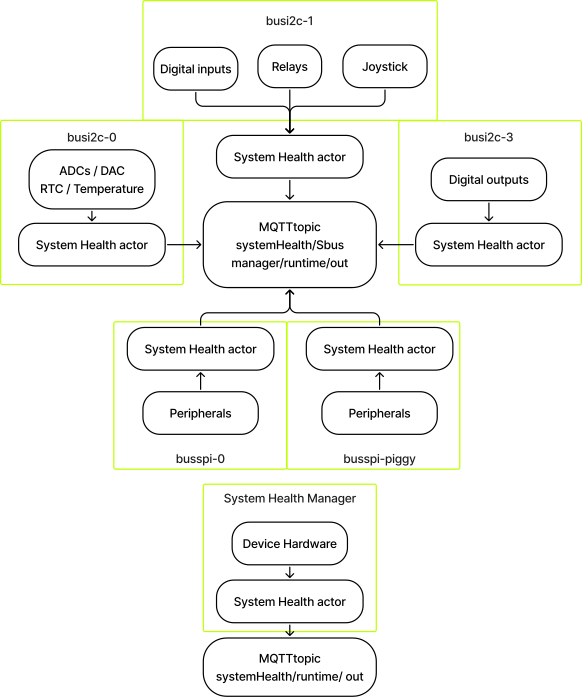
example
For busi2c-0:
Answer topic: systemHealth/busi2c-0/runtime/out
Payload:
{
"id": 1770378753024,
"origin": "system-health-busi2c-0",
"task": {
"taskResult": {
"ADC": {
"status": "ERROR",
"description": "IRQ Retrying",
"last\_report": 1770378753006,
"stats": {
"AI1": {
"samples": 563154,
"retries": 760548,
"discards": 253313
},
"AI2": {
"samples": 563154,
"retries": 760475,
"discards": 253314
},
"AI3": {
"samples": 563154,
"retries": 760528,
"discards": 253313
},
"AI4": {
"samples": 563154,
"retries": 760549,
"discards": 253312
}
}
},
"DAC": {
"status": "OK",
"description": "Running....",
"last\_report": 1770378752576,
"stats": {
"AO1": {
"samples": 240755,
"retries": 0,
"discards": 0
},
"AO2": {
"samples": 240755,
"retries": 0,
"discards": 0
}
}
},
"RTC": {
"status": "OK",
"description": "",
"last\_report": 1770378752094,
"stats": {
"samples": 248710,
"retries": 0,
"discards": 0
}
},
"TEMP": {
"status": "OK",
"description": "",
"last\_report": 1770378752579,
"stats": {
"samples": 240754,
"retries": 0,
"discards": 0
}
}
}
}
}
Answer topic: systemHealth/busi2c-1/runtime/out
Payload:
{
"id": 1770382405107,
"origin": "system-health-busi2c-1",
"task": {
"taskResult": {
"JOYSTICK": {
"status": "OK",
"description": "Running....",
"last\_report": 1770382405050,
"stats": {
"read\_all": {
"samples": 410154,
"retries": 0,
"discards": 0
},
"read\_raw": {
"samples": 0,
"retries": 0,
"discards": 0
},
"buttons": {
"JDOWN": {
"reads": 410154,
"last\_state": "pressed"
},
"JRIGHT": {
"reads": 410154,
"last\_state": "pressed"
},
"JUP": {
"reads": 410154,
"last\_state": "pressed"
},
"JLEFT": {
"reads": 410154,
"last\_state": "pressed"
},
"JCENTER": {
"reads": 410154,
"last\_state": "pressed"
}
}
}
},
"RELAYS": {
"status": "OK",
"description": "Relay Output MQTT connected",
"last\_report": 1770298859099,
"stats": {
"read\_all": {
"samples": 0,
"retries": 0,
"discards": 0
},
"set": {
"samples": 0,
"retries": 0,
"discards": 0
},
"set\_many": {
"samples": 0,
"retries": 0,
"discards": 0
},
"raw\_read\_all": {
"samples": 0,
"retries": 0,
"discards": 0
}
},
"outputs": {
"DO1": {
"writes": 0,
"last\_state": "unknown"
},
"DO2": {
"writes": 0,
"last\_state": "unknown"
}
}
},
"DI": {
"status": "OK",
"description": "Running",
"last\_report": 1770382404832,
"stats": {
"read\_all": {
"samples": 181758,
"retries": 0,
"discards": 0
},
"read\_raw": {
"samples": 0,
"retries": 0,
"discards": 0
},
"inputs": {
"DI1": {
"reads": 181758,
"last\_state": "low"
},
"DI2": {
"reads": 181758,
"last\_state": "low"
},
"DI3": {
"reads": 181758,
"last\_state": "low"
},
"DI4": {
"reads": 181758,
"last\_state": "low"
}
}
}
}
}
}
}
TempSensor Actor
App Interface
User app interface and functionalities available to the open part of the MQTT broker. Simplified interface for configuring and receiving peripheral data. The connection to the broker for this area does not require a vote of confidence.
Temperature sensor settings
Required Topic: tempSensor/config/in
ALARM:
- Activate: true(active)/false
- Temperature: Alarm temperature lower limit
- TemperatureHigh: Alarm temperature upper limit Answer topic: tempSensor/konfiguration/out Read ##### Temperature Sensor Configurations
Required Topic: tempSensor/config/in
ALARM:
- Activate: true(active)/false
LIMITS:
- Temperature: Alarm temperature lower limit
- TemperatureHigh: Alarm temperature upper limit Answer topic: tempSensor/konfiguration/out
View temperature and alarm status
- Unit: Temperature Unit
- Warning: true (triggered) or false
Required topic: tempSensor/Runtime
Answer topic: tempSensor/runtime/out{
"id": "<TIMESTAMP>",
"origin": "APP",
"task": {
"taskResult": {
"success": true,
"data": {
"temperature": <\_FLOAT\_>,
"unit": "C",
"alert": true
}
}
}
}
TFT Actor
App Interface
User app interface and functionalities available to the open part of the MQTT broker. Simplified user interface for controlling and interacting with the TFT display or LCD front panel. The connection to the broker for this area does not require any access data.
TFT Display Actor
The TFT actor is responsible for:
- Rendering static and informative screens on the TFT display
- Reagent on joystick input (LEFT/ RIGHT/ CENTER/ UP/ DOWN)
- Manage screen navigation and user confirmation flows
- Provide feedback to the application via MQTT
screen carousel concept
The TFT actor keeps an ordered list of screens (carousel).
- The screens are navigated with the joystick:
- LEFT --> Previous Screen
- CORRECT --> Next Screen
- The carousel wraps around:
- LEFT on the first screen --> last screen
- EXACTLY on the last screen --> first screen
screen types
The TFT actor supports the following screen types:
a.) Picture screen
- Displays a static JPEG image
- Default screen is displayed at startup
- No user interaction required
b.) Network Information Screen
- Display an interface with information about the device's networks
- Updated on load
- No user interaction required
joystick navigation logic
Carousel navigation:
| Joystick Input | Action |
| LINKS | Previous Screen |
| TRUE | Next Screen |
| DOWN | Update Current Screen |
boot behavior
For system boots:
- The TFT actuator initializes the display
- The last available carousel is loaded
- The first screen is rendered
- Joystick subscriptions will be activated
- The Actor Waits for Runtime Commands
Design Notes and Limitations
- TFT actor does not show joystick state freely
- Joystick actor remains independent
- TFT actor consumes joystick events internally
- Carousel State is local to the TFT actor
- Screen rendering is synchronous; Incoming treatment is carried out asynchronously
- Confirmation screens always require explicit CENTER printing
Interaction via MQTT
Enabling interaction with the carousel via the topic tft/runtime/in . Available actions are public to the user.
Runtime Commands
Go to the screen
Required topic: tft/runtime/in
{
"id": "<TIMESTAMP>",
"origin": "APP",
"task": {
"action": "SET\_CAROUSEL",
"params": {
"index": 2
}
}
}
{
"id": "TIMESTAMP",
"origin": "APP",
"task": {
"action": "SET\_CAROUSEL",
"params": {
"startIndex": 0,
"screens": \[
{
"type": "image",
"image": "default.jpg"
},
{
"type": "image",
"image": "status.jpg"
},
{
"type": "confirm",
"question": "Do you want to continue?"
}
\]
}
}
}
| Field | Description |
| Screens | Ordered List of Screens |
| Home lndex | Initial Active Screen (Optional, Default = 0) |
Answer
Answer topic: tft/runtime/out
{
"id": "TIMESTAMP",
"origin": "tft",
"task": {
"taskResult": {
"success": true,
"activeIndex": 0,
"totalScreens": 3
}
}
}
Analoglnputs Actor
App Interface
User app interface and functionalities available to the open part of the MQTT broker. Simplified interface for configuring and receiving peripheral data. The connection to the broker for this area does not require a vote of confidence.
configurations
Topic: analoglnputs/konfiguration/in – Setting ADC channel configurations
Mode
- continuous
- Single
Type
- Voltage
- current Answer topic: analoglnputs/config/out
Runtime Data
Topic: Analog Inputs/Runtime/In.
Action:
- READ
- PAUSE (only applicable in continuous mode)
- RESUME (only applicable in continuous mode) Answer Topic: Analog Inserts/Runtime/Off
Analog Output Actor
App Interface
User app interface and functionalities available to the open part of the MQTT broker. Simplified interface for configuring and receiving peripheral data. The connection to the broker for this area does not require a vote of confidence.
Setting Analog Output Signal
Desired topic: analogOutputs/config/in
Output: Current within 0-20 mA
Mode: On/Off
{
"id": "<TIMESTAMP>",
"origin": "APP",
"task": {
"taskParams": {
"mode": "on",
"AO1": {
"current": <\_FLOAT\_>
},
"AO2": {
"current": <\_FLOAT\_>
}
}
}
}
{
"id": "<TIMESTAMP>",
"origin": "APP",
"task": {
"taskResult": {
"mode": "on",
"AO1": {
"success": true,
"current": <\_FLOAT\_>
},
"AO2": {
"success": true,
"current": <\_FLOAT\_>
}
}
}
}
Setting Analog Outputs
Requirement Topic: Analog Expenditure/Duration
Current: Current within 0-20 mA
{
"id": "<TIMESTAMP>",
"origin": "APP",
"task": {
"taskParams": {
"AO1": {
"action": "SET",
"current": <\_FLOAT\_>
},
"AO2": {
"action": "SET",
"current": <\_FLOAT\_>
}
}
}
}
{
"id": "<TIMESTAMP>",
"origin": "APP",
"task": {
"taskResult": {
"AO1": {
"success": true,
"current": <\_FLOAT\_>
},
"AO2": {
"success": true,
"current": <\_FLOAT\_>
}
}
}
}
Reading Analog Output Settings
Requirement Topic: Analog Expenditure/Duration
Current: Current within 0–20 mA
{
"id": "<TIMESTAMP>",
"origin": "APP",
"task": {
"taskParams": {
"AO1": {
"action": "READ"
},
"AO2": {
"action": "READ"
}
}
}
}
{
"id": "<TIMESTAMP>",
"origin": "APP",
"task": {
"taskResult": {
"AO1": {
"success": true,
"current": <\_FLOAT\_>
},
"AO2": {
"success": true,
"current": <\_FLOAT\_>
}
}
}
}
Digital Input Actor
App Interface
User app interface and functionalities available to the open part of the MQTT broker. Simplified interface for configuring and receiving peripheral data. The connection to the broker for this area does not require any access data.
Adjust the speed of the digital input pins/pins quickly/slowly
The fast speed setting supports edge detection up to 100 Hz and the slow speed setting up to 10 Hz.
Quick Mode generates a message every time the I/O state changes, which can result in a high message payload during operation. Therefore, Quick Mode should only be enabled if absolutely necessary is required.
Prerequisite topic: digitallnputs/config/in
{
"id": "<TIMESTAMP>",
"origin": "APP",
"task": {
"taskParams": {
"DI1": {
"speed": "fast"
},
"DI2": {
"speed": "slow"
},
"DI3": {
"speed": "fast"
},
"DI4": {
"speed": "fast"
}
}
}
}
{
"id": "<TIMESTAMP>",
"origin": "APP",
"task": {
"taskResult": {
"DI1": {
"success": true,
"speed": "fast"
},
"DI2": {
"success": true,
"speed": "slow"
},
"DI3": {
"success": true,
"speed": "fast"
},
"DI4": {
"success": true,
"speed": "fast"
}
}
}
}
Get the status of all digital input pins.
Desired topic: digital entries/runtime
Answer Topic: digitalinputs/runtime/out state: high/low{
"id": "<TIMESTAMP>",
"origin": "APP",
"task": {
"taskResult": {
"DI1": {
"success": true,
"state": "high"
},
"DI2": {
"success": true,
"state": "low"
},
"DI3": {
"success": true,
"state": "high"
},
"DI4": {
"success": true,
"state": "low"
}
}
}
}
Digital Source Actor
App Interface
User app interface and functionalities available to the open part of the MQTT broker. Simplified interface for configuring and receiving peripheral data. The connection to the broker for this area does not require any declarations of faith.
Get the state of all digital output pins
Requirement topic: digitalOutputs/Runtime/in
Answer topic: digitalOutputs/Runtime/out{
"id": "<TIMESTAMP>",
"origin": "APP",
"task": {
"taskResult": {
"DO1": {
"success": true,
"state": "low"
},
"DO2": {
"success": true,
"state": "high"
},
"DO3": {
"success": true,
"state": "high"
},
"DO4": {
"success": true,
"state": "low"
},
"DO5": {
"success": true,
"state": "low"
},
"DO6": {
"success": true,
"state": "low"
},
"DO7": {
"success": true,
"state": "low"
},
"DO8": {
"success": true,
"state": "low"
}
}
}
}
Set the state of all digital output pins
Requirement topic: digitalOutputs/Runtime/in
{
"id": "<TIMESTAMP>",
"origin": "APP",
"task": {
"taskParams": {
"DO1": {
"action": "SET",
"state": "low"
},
"DO2": {
"action": "SET",
"state": "high"
},
"DO3": {
"action": "SET",
"state": "high"
},
"DO4": {
"action": "SET",
"state": "low"
},
"DO5": {
"action": "SET",
"state": "low"
},
"DO6": {
"action": "SET",
"state": "low"
},
"DO7": {
"action": "SET",
"state": "low"
},
"DO8": {
"action": "SET",
"state": "low"
}
}
}
}
{
"id": "<TIMESTAMP>",
"origin": "APP",
"task": {
"taskResult": {
"D01": {
"success": true,
"state": "low"
},
"D02": {
"success": true,
"state": "high"
},
"D03": {
"success": true,
"state": "high"
},
"D04": {
"success": true,
"state": "high"
},
"D05": {
"success": true,
"state": "high"
},
"D06": {
"success": true,
"state": "low"
},
"D07": {
"success": true,
"state": "low"
},
"D08": {
"success": true,
"state": "low"
}
}
}
}
Notes
If the Busi2c-3 is not powered, we will get the following:
Subject: Paragraph a lExpenditure/Duration/from
{
"id": "<TIMESTAMP>",
"origin": "APP",
"task": {
"taskResult": {
"DO1": {
"success": false,
"state": "DO\_not\_powered"
},
"DO2": {
"success": false,
"state": "DO\_not\_powered"
},
"DO3": {
"success": false,
"state": "DO\_not\_powered"
},
"DO4": {
"success": false,
"state": "DO\_not\_powered"
},
"DO5": {
"success": false,
"state": "DO\_not\_powered"
},
"DO6": {
"success": false,
"state": "DO\_not\_powered"
},
"DO7": {
"success": false,
"state": "DO\_not\_powered"
},
"DO8": {
"success": false,
"state": "DO\_not\_powered"
}
}
}
}
Joystick Actor
App Interface
User app interface and functionalities available to the open part of the MQTT broker. Simplified interface for configuring and receiving peripheral data. The connection to the broker for this area does not require a vote of confidence.
Get all joystick pins into state
Req-Topic: joystick/runtime/in
{
  "id": "<TIMESTAMP>",
  "origin": "APP",
  "task": {
    "action": "READ"
  }
}
{
  "id": "<TIMESTAMP>",
  "origin": "APP",
  "task": {
    "taskResult": {
      "JLEFT": {
        "success": true,
        "state": "pressed"
      },
      "JRIGHT": {
        "success": true,
        "state": "released"
      },
      "JUP": {
        "success": true,
        "state": "released"
      },
      "JDOWN": {
        "success": true,
        "state": "released"
      },
      "JCENTER": {
        "success": true,
        "state": "released"
      }
    }
  }
}
Included Software Stack
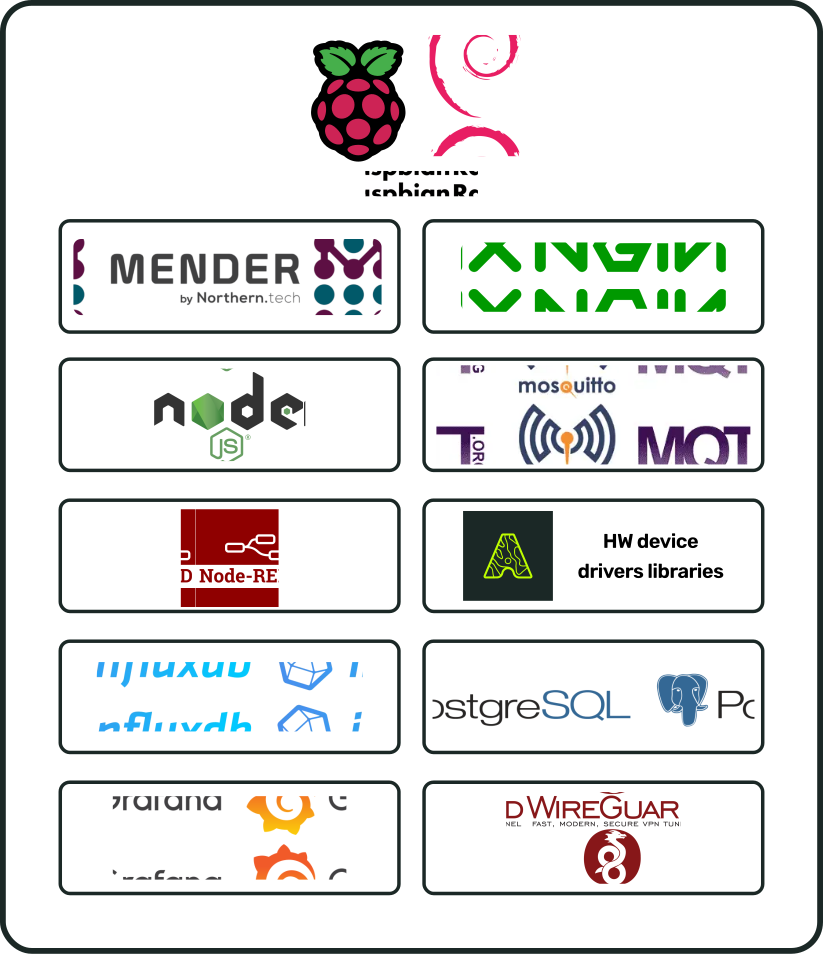
Hardware Libraries
[IMAGE PLACEHOLDER]
Related Products
| PA | Name | Requirements |
Accessories
| PA | Name | Requirements |
Document history
| Version | Description | Date |
| SBADATAv0.1 | First version of the i.Cee² datasheet | Nov 03, 2026 |
i.Cee² in the field
[IMAGE PLACEHOLDER]